
Content creation has become faster and more competitive in 2026. Bloggers, YouTubers, social media creators, podcasters, freelancers, marketers, and online business owners are producing content across multiple platforms every day.
The good news is that artificial intelligence can now help with almost every stage of the content creation process. AI tools can assist with brainstorming ideas, researching topics, writing scripts, creating images, editing videos, generating voiceovers, designing social media graphics, and repurposing existing content.
However, choosing the right tools can be difficult because there are hundreds of AI-powered applications available. Some focus on writing, while others specialize in design, video editing, research, audio, or automation.
The best approach is not to use every AI tool available. Instead, choose tools that match your content format and workflow.
In this guide, we will explore some of the best AI tools for content creators in 2026 and explain how each tool can help you create content more efficiently.
Why Content Creators Are Using AI in 2026
Traditional content creation can take a lot of time.
A single blog post may require research, outlining, writing, editing, images, SEO, and promotion. A YouTube video may require research, scripting, recording, editing, thumbnails, captions, and short-form clips.
AI can help speed up many of these steps.
Current 2026 creator-tool guides describe AI as useful across the full workflow, from ideation and writing to design, video editing, voice generation, repurposing, and distribution.
The goal is not simply to generate more content. A better goal is to spend less time on repetitive tasks so you can focus more on ideas, creativity, quality, and audience connection.
1. ChatGPT
ChatGPT is one of the most flexible AI tools available to content creators.
It can help with brainstorming, research assistance, outlines, scripts, captions, article drafts, content calendars, editing, and many other tasks.
For example, a YouTube creator can use it to brainstorm video ideas and create a first script outline. A blogger can use it to develop article structures and headline ideas. A social media creator can use it to generate caption variations.
ChatGPT can also help repurpose existing content.
You could provide a long article and ask for:
- Social media post ideas
- Short video scripts
- Email newsletter ideas
- Video hooks
- FAQ questions
- Content summaries
- Social captions
This makes it useful as a general-purpose starting point for a creator workflow.
2. Canva AI
Visual content is an important part of modern content creation.
Canva combines design tools with AI-powered features that can help creators produce social media graphics, presentations, thumbnails, posters, images, and other visual assets.
For creators who are not professional designers, this can make visual production much easier.
You can use Canva to create:
- YouTube thumbnails
- Instagram posts
- Blog graphics
- Pinterest graphics
- Social media carousels
- Presentations
- Promotional designs
One advantage of using a platform like Canva is that you can work with templates, layouts, images, and other design elements in one environment.
Current 2026 creator workflows continue to position Canva as a major visual-production tool, particularly for creators who need finished graphics without advanced design skills.
3. CapCut
Video has become one of the most important content formats, especially for short-form platforms.
CapCut provides video editing features that can help creators produce short videos, social clips, captions, transitions, and other visual content.
AI-powered features can reduce the amount of manual editing required.
For example, creators can use automatic captions, background removal, templates, effects, and other editing features to speed up production.
CapCut can be particularly useful for:
- TikTok-style videos
- Instagram Reels
- YouTube Shorts
- Short promotional videos
- Social media clips
Its combination of editing and AI features makes it useful for creators who want to produce short-form content efficiently. Recent 2026 comparisons continue to include CapCut among the major creator video tools.
4. Adobe Firefly
Adobe Firefly is designed for AI-powered creative generation and works especially well within the wider Adobe ecosystem.
Content creators can use it for generating and modifying visual assets, exploring creative concepts, and supporting image-related workflows.
This can be useful for bloggers, designers, marketers, photographers, and creators who already work with Adobe products.
One important consideration for professional creators is understanding the licensing and commercial-use terms of any AI-generated content before using it in paid projects.
Adobe Firefly can be especially useful when AI generation needs to fit into a professional creative workflow.
5. Descript
Descript is particularly useful for creators who work with podcasts, interviews, talking-head videos, and other spoken content.
One of its major workflow ideas is transcript-based editing. Instead of treating the recording only as a video or audio timeline, creators can work with the transcript and use it to make edits.
This can make certain editing tasks easier and faster.
Creators can use Descript for:
- Podcast editing
- YouTube videos
- Interviews
- Video transcripts
- Captions
- Audio cleanup
- Repurposing spoken content
For creators who regularly publish talking-head or podcast content, this type of workflow can save considerable editing time.
6. ElevenLabs
Audio is another important part of modern content creation.
ElevenLabs provides AI-powered voice and audio capabilities that can be used for narration, voiceovers, dubbing, and other audio projects.
For example, a creator producing educational videos could use AI-generated narration as part of a production workflow.
It can also be useful for creators working with multilingual content or experimenting with different voice formats.
However, creators should always make sure they have the necessary rights and permissions when working with voice cloning or voice-based content.
7. Perplexity
Research is one of the most important stages of content creation.
Before writing an article, creating a video, or publishing an educational post, creators often need to understand the topic and find useful information.
Perplexity can help with conversational research and source discovery.
It can be useful for:
- Topic research
- Question discovery
- Content research
- Source exploration
- Quick summaries
- Research brainstorming
AI research tools can save time during the early stages of content production, but creators should still verify important information using reliable original sources.
This is especially important for articles involving statistics, products, prices, laws, scientific information, or other factual claims.
8. Runway
Video generation is another area where AI has developed rapidly.
Runway is designed around AI-powered video and creative generation workflows.
For creators, tools in this category can be useful when they need visual material that would otherwise require filming, animation, or complicated production.
Possible applications include:
- Creative video concepts
- B-roll-style visuals
- Short cinematic sequences
- Experimental content
- Visual storytelling
- Marketing videos
Generative video should be treated as another creative tool rather than a complete replacement for traditional production.|
The best results often come from combining AI-generated visuals with strong storytelling and human editing.
9. Grammarly
Good content is not only about generating ideas. It also needs to be clear and readable.
>Grammarly can help creators review written content and improve areas such as grammar, clarity, tone, and wording.
It can be useful for:
- Blog posts
- Emails
- YouTube descriptions
- Social media captions
- Newsletters
- Marketing copy
- Website content
AI writing assistance can help identify problems that are easy to miss during editing.
Still, creators should maintain their own voice. Automatically accepting every AI suggestion can make content sound generic.
10. Notion AI
Content creators often need more than writing and design tools. They also need a system for organizing ideas.
Notion can be used for content calendars, notes, research, project planning, databases, and documentation.
With AI features, creators can use their workspace to help summarize information, organize notes, develop ideas, and work with existing content.
For example, you could create a content database containing:
- Article ideas
- YouTube topics
- Social media posts
- Research notes
- Publishing dates
- Content status
- Keywords
This can help turn scattered ideas into an organized content system.
Best AI Tools for Different Types of Creators

Not every creator needs the same tools.
Bloggers
Bloggers may benefit from a combination of ChatGPT, Perplexity, Grammarly, Canva, and Notion.
This combination can support research, writing, editing, visual creation, and content planning.
YouTubers
YouTubers may need tools for scripting, thumbnails, video editing, voice, and content repurposing.
A workflow could include ChatGPT for scripts, Canva for thumbnails, Descript or CapCut for editing, and an AI voice tool when narration is required.
Social Media Creators
Social media creators often need to produce content quickly.
Canva can help with graphics, CapCut with short-form video, and ChatGPT with captions, hooks, and content ideas.
Podcasters
Podcasters can benefit from tools such as Descript for editing and transcription, along with AI writing assistants for episode planning and promotional content.
Freelance Content Creators
Freelancers may need a broader toolset because they often work for multiple clients.
They may use AI for research, writing, design, editing, project management, and client communication.
How to Build an AI Content Creation Workflow
Using individual AI tools is useful, but creating a workflow can be even more effective.
A simple content workflow could look like this:
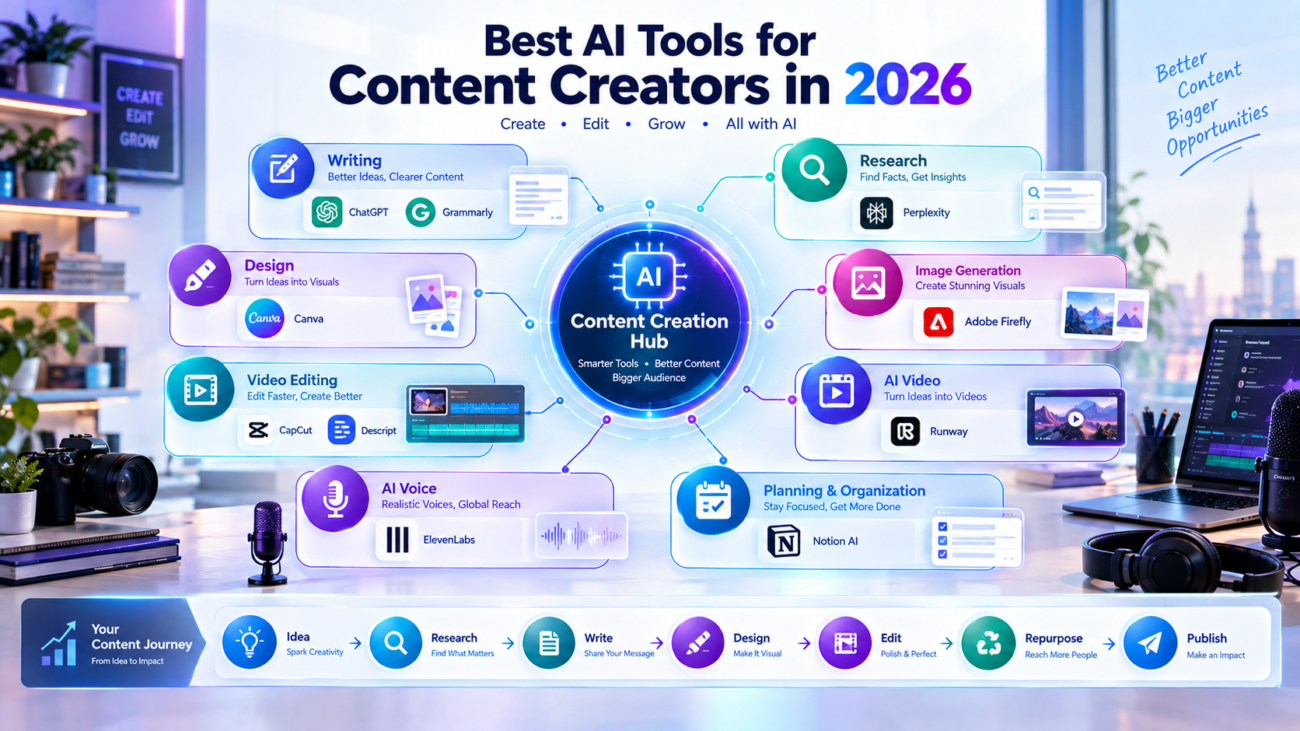
Research → Plan → Create → Edit → Design → Repurpose → Publish
First, research the topic and identify useful information.
Next, create an outline or content plan.
Then produce the main piece of content.
After that, edit the content and check accuracy.
Create supporting graphics, thumbnails, or visual elements.
Repurpose the main content into smaller pieces for other platforms.
Finally, publish and analyze the results.
This approach helps creators avoid randomly switching between different AI tools.
How AI Can Help Save Time
AI can reduce time spent on repetitive content tasks.
For example, one long YouTube video can potentially become:
- One full YouTube video
- Several short clips
- Multiple social media posts
- A blog article
- An email newsletter
- Several quote graphics
The creator still needs to review and edit the output, but AI can help accelerate the transformation process.
This is one reason modern creator workflows are increasingly focused on repurposing one piece of content into multiple formats.
Mistakes Content Creators Should Avoid
AI can be powerful, but it does not automatically produce high-quality content.
Publishing AI Content Without Editing
AI-generated content can contain errors, repetition, or generic language.
Always review the final result.
Using the Same Style Everywhere
If every article, video, and social post sounds like AI, your audience may notice.
Add your own experience, examples, opinions, storytelling, and personality.
Using Too Many Tools
You do not need ten different AI subscriptions to become productive.
Start with the tools that solve your biggest problems.
Ignoring Accuracy
AI can provide incorrect or outdated information.
Verify important claims before publishing them.
Forgetting Your Audience
AI can help produce content, but it cannot completely replace your understanding of your audience.
Know what your readers or viewers actually want.
How to Choose the Right AI Tools
Before choosing an AI tool, ask yourself what type of content you create most often.
>If you mainly write, focus on writing and research tools.
>If you create videos, prioritize video editing and generation.
>If you publish social media graphics, choose a strong design platform.
>If you produce podcasts, look for transcription and audio editing capabilities.
You should also consider:
- Ease of use
- Pricing
- Free plan availability
- Export options
- Integrations
- Privacy
- Commercial-use requirements
- Output quality
- Your existing workflow
The best tool is usually the one that fits naturally into the way you already work.
Final Thoughts
AI has become an important part of content creation in 2026. Creators can now use AI for research, brainstorming, writing, design, image generation, video editing, voiceovers, organization, and content repurposing.
Tools such as ChatGPT, Canva, CapCut, Adobe Firefly, Descript, ElevenLabs, Perplexity, Runway, Grammarly, and Notion AI can support different stages of the creative process. Current 2026 tool comparisons similarly show that creator workflows increasingly combine specialized tools rather than relying on one application for everything.
The important thing is not to let AI replace your creativity.
Use AI to handle repetitive work, generate starting points, organize information, and speed up production. Then add your own ideas, experience, editing, storytelling, and judgment.
A strong creator workflow is not about producing the most content possible. It is about creating useful, original, and engaging content more efficiently.
