

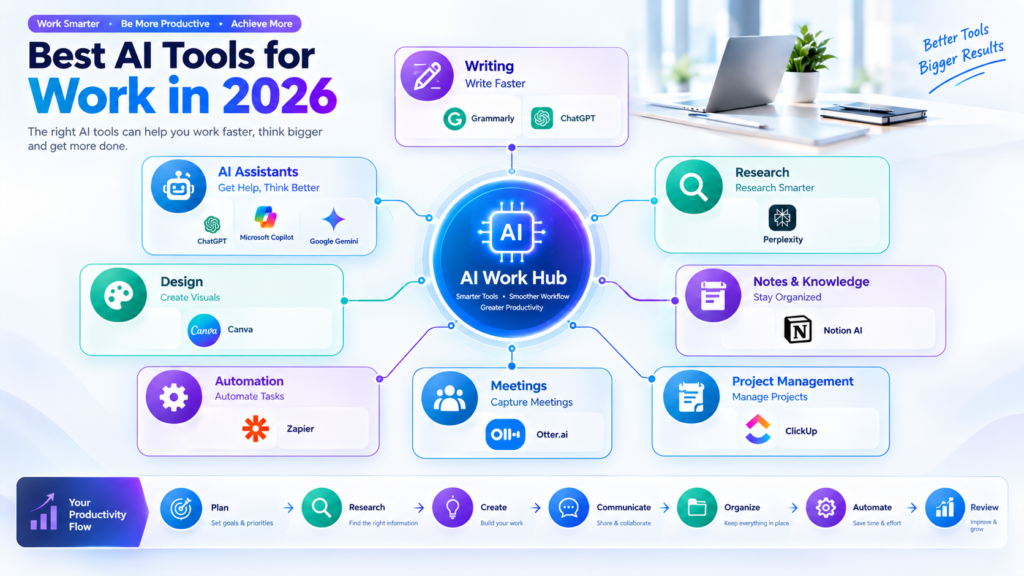
Artificial intelligence has become an important part of modern work. From writing emails and researching information to managing projects and automating repetitive tasks, AI tools can help professionals complete everyday work more efficiently.
In 2026, there are AI tools for almost every type of workplace task. Some are designed as general-purpose assistants, while others focus on writing, meetings, research, project management, design, or automation.
The challenge is no longer finding an AI tool. The real challenge is choosing tools that fit your workflow and actually save time.
In this guide, we look at some of the best AI tools for work in 2026 and explain how they can be useful for employees, freelancers, business owners, remote workers, and teams.
Why Use AI Tools at Work?
AI can assist with many repetitive and time-consuming tasks. Instead of spending hours creating a first draft, organizing information, summarizing meetings, or searching through documents, workers can use AI to speed up these processes.
Some common benefits include:
- Faster content creation
- Better organization
- Easier research
- Meeting summaries
- Improved communication
- Task management
- Workflow automation
- Data organization
- Time savings
- Better productivity
AI does not have to replace the way you work. Used properly, it can become an additional assistant that helps you handle routine tasks while you focus on important decisions and creative work.
1. ChatGPT
ChatGPT is one of the most versatile AI tools for professional work. It can be used for brainstorming, writing, summarizing, planning, research assistance, and many other everyday tasks.
Professionals can use it to create email drafts, generate ideas, explain complicated topics, organize information, prepare meeting agendas, and improve written communication.
Useful for:
- Writing and editing
- Brainstorming
- Research assistance
- Planning
- Summarizing
- Learning new concepts
- Creating drafts
One of its biggest advantages is flexibility. The same tool can support different types of work depending on the instructions you provide.
2. Microsoft Copilot
Microsoft Copilot is designed to bring AI assistance into the Microsoft ecosystem. For professionals who regularly use Microsoft applications, an AI assistant can make common workplace activities easier.
Copilot can assist with tasks such as drafting content, summarizing information, analyzing documents, and working with productivity applications.
Useful for:
- Office work
- Writing
- Document assistance
- Productivity
- Business communication
- Information organization
For organizations already using Microsoft products, integrating AI into familiar workflows can reduce the need to switch between multiple applications.
3. Google Gemini
Google Gemini is another general-purpose AI assistant that can support professional tasks such as brainstorming, writing, information processing, and planning.
It can be particularly useful for people who already work within Google’s productivity ecosystem.
Useful for:
- Writing
- Brainstorming
- Research assistance
- Planning
- Summarization
- General workplace tasks
Professionals can use an AI assistant like Gemini to create an initial draft or organize ideas before reviewing and refining the final work.
4. Grammarly
Grammarly focuses on writing and communication. Clear communication is important in almost every workplace, especially when writing emails, reports, proposals, presentations, and online messages.
AI-powered writing assistance can help identify grammar issues, improve clarity, adjust tone, and make written communication easier to understand.
Useful for:
- Emails
- Business writing
- Reports
- Editing
- Grammar
- Professional communication
For employees who write frequently, an AI writing assistant can become a useful final-review step before sending important messages.
5. Notion AI
Notion AI combines workspace organization with AI-powered assistance. Notion is commonly used for notes, documentation, project information, and knowledge management.
AI features can help users summarize information, generate drafts, organize ideas, and work with content stored inside their workspace.
Useful for:
- Notes
- Documentation
- Knowledge management
- Project information
- Content organization
- Team collaboration
For teams that keep large amounts of information in one workspace, AI-assisted organization can make that information easier to work with.
6. ClickUp
ClickUp is a project management platform that includes AI features designed to support workplace productivity.
Teams can use project management software to organize tasks, deadlines, documents, and collaboration. AI assistance can help with content generation, summaries, task-related information, and other productivity activities.
Useful for:
- Project management
- Task organization
- Team collaboration
- Planning
- Documentation
- Productivity
This makes AI-enhanced project management especially useful for teams working on multiple projects at the same time.
7. Perplexity
Research is another major area where AI can save time. Perplexity is designed around AI-assisted search and research, making it useful when users need to explore a topic and review information from online sources.
Professionals can use research-focused AI tools to quickly understand a subject, discover relevant information, and develop ideas for further investigation.
Useful for:
- Research
- Market research
- Topic discovery
- Information gathering
- Competitive research
- Fact checking
AI research tools should still be used carefully. Important information should be reviewed against reliable sources before being used in professional decisions.
8. Otter.ai
Meetings can consume a significant amount of working time. Otter.ai focuses on transcription and meeting-related workflows, helping users capture and review conversations.
Instead of relying entirely on handwritten notes, professionals can use AI-powered transcription to create a record of discussions and identify important points.
Useful for:
- Meeting transcription
- Meeting notes
- Summaries
- Interviews
- Team discussions
- Action items
This can be particularly helpful for remote and hybrid teams where meetings are an important part of daily communication.
9. Zapier
Automation is one of the most practical applications of AI and workflow technology. Zapier connects different applications so that repetitive actions can happen automatically.
For example, a business might connect forms, email, spreadsheets, project management software, and customer systems into automated workflows.
Useful for:
- Workflow automation
- Repetitive tasks
- App integrations
- Lead management
- Notifications
- Business processes
Automation can reduce the amount of manual work required for routine processes and allow employees to spend more time on higher-value activities.
10. Canva
Canva is widely used for creating visual content, and its AI-powered features can assist with design and content creation.
Professionals can use it to create presentations, social media graphics, marketing materials, documents, and other visual assets.
Useful for:
- Presentations
- Marketing graphics
- Social media
- Visual content
- Business documents
- Branding
You do not necessarily need advanced graphic design skills to create professional-looking visual materials with modern AI-assisted design tools.
How to Choose the Right AI Tool for Work

There is no single AI tool that is perfect for every professional. The right choice depends on the type of work you do.
Before choosing a tool, consider these factors:
1. Identify Your Biggest Time-Wasting Tasks
Look at your daily workflow. Are you spending too much time writing emails, attending meetings, researching topics, organizing tasks, or entering information manually?
Start with the task that consumes the most time.
2. Choose Specialized Tools When Necessary
A general AI assistant may be enough for brainstorming and writing. However, specialized tools can be more useful for meetings, project management, research, design, or automation.
3. Check Integration Options
A tool becomes more useful when it works with the applications you already use.
For example, teams may benefit from tools that connect with their existing email, calendar, project management, communication, or document systems.
4. Review AI-Generated Information
AI can produce incorrect or incomplete information. Always review important content, especially information used in business reports, financial decisions, customer communication, or professional documents.
5. Consider Privacy and Security
Before putting confidential business information into an AI service, review its privacy practices, data controls, and organizational policies.
Companies should also establish clear internal rules for how employees can use AI with sensitive information.
How AI Can Improve a Typical Workday
A professional might use several AI tools throughout a normal workday.
The day could begin with an AI assistant helping organize priorities. A writing tool could then help polish emails and reports. A research tool could assist with gathering information for a project.
During meetings, transcription software can help capture important points. Project management tools can organize tasks afterward, while automation platforms can handle repetitive follow-up actions.
This creates a connected workflow where AI supports different stages of the working process.
AI Workday Workflow
Plan → Research → Create → Communicate → Organize → Automate → Review
The goal is not to use AI for every task. Instead, identify where it provides genuine value and use it as part of a practical workflow.
Final Thoughts
The best AI tools for work in 2026 cover a wide range of professional needs. ChatGPT, Microsoft Copilot, and Google Gemini can provide general AI assistance, while Grammarly focuses on communication, Notion AI and ClickUp support organization, Perplexity helps with research, Otter.ai assists with meetings, Zapier supports automation, and Canva helps with visual content.
The most effective approach is to start small. Choose one or two repetitive tasks that take up too much time and test whether an AI tool can improve the process.
As your workflow develops, you can add other tools where they provide clear benefits. With the right combination of AI assistance, human judgment, and careful review, AI can become a valuable part of modern professional work.
