
Artificial intelligence has changed the way people work, plan tasks, organize information, communicate, and manage their daily responsibilities. In 2026, AI productivity tools are no longer limited to simple chatbots. Many tools can now help with writing, research, meetings, project management, scheduling, note-taking, automation, and other everyday tasks.
The main goal of an AI productivity tool is simple: help you complete useful work with less repetitive effort. Instead of spending hours organizing information or creating the first draft of a document, you can use AI to speed up parts of the process while keeping human judgment and creativity involved.
There are now many AI productivity tools available, and each one is designed for different types of work. Some are general AI assistants, while others focus on writing, meetings, research, project management, or automation.
In this guide, we will explore some of the most useful AI productivity tools to consider in 2026 and explain how they can fit into a modern workflow.
What Are AI Productivity Tools?
AI productivity tools are software applications that use artificial intelligence to help users complete tasks more efficiently.
These tools can assist with activities such as:
- Writing and editing
- Research and information gathering
- Task planning
- Meeting notes
- Project management
- Time management
- Brainstorming
- Document organization
- Data analysis
- Workflow automation
- Communication
Instead of replacing every part of a person’s work, AI productivity tools are generally most useful when they handle repetitive or time-consuming parts of a task.
For example, you can use an AI assistant to create an initial email draft, then review and personalize it yourself.
Why Use AI Productivity Tools in 2026?
Modern work often involves managing many different tasks at the same time. Employees, freelancers, business owners, students, and content creators may need to write documents, attend meetings, research topics, organize projects, and respond to messages throughout the day.
AI can help reduce some of this workload.
A productivity-focused AI tool can help you start a task faster, organize information, create drafts, summarize long content, or connect different applications into a workflow.
However, AI should be treated as an assistant rather than an automatic replacement for human decision-making. Important information should still be checked before it is used or shared.
1. ChatGPT
ChatGPT is a general-purpose AI assistant that can support a wide range of productivity tasks.
You can use it for brainstorming, writing, summarizing, planning, research assistance, explanations, data-related tasks, and creating structured content.
For example, you could ask ChatGPT to:
- Create a daily task plan
- Draft a professional email
- Summarize a long document
- Brainstorm content ideas
- Create a project checklist
- Explain a complicated topic
- Turn notes into a structured document
- Help organize a workflow
One of its biggest advantages is flexibility. Instead of using it for only one type of task, you can adapt it to different parts of your daily workflow.
2. Microsoft Copilot
Microsoft Copilot is designed to bring AI assistance into Microsoft’s broader productivity environment.
For people who regularly work with applications such as Word, Excel, PowerPoint, and Outlook, AI assistance can be particularly useful when it is connected to familiar work processes.
Possible productivity uses include drafting documents, summarizing information, working with spreadsheets, preparing presentations, and assisting with email-related tasks.
This makes AI more useful when it becomes part of the software you already use rather than requiring you to constantly switch between different applications.
3. Google Gemini
Google Gemini can help with writing, brainstorming, research, summarization, and other general productivity tasks.
It can be especially useful for people who already rely heavily on Google’s ecosystem.
You can use an AI assistant for tasks such as creating ideas, organizing information, preparing written content, summarizing material, or developing a plan for a project.
The important benefit is not simply generating text. The real value comes from using AI as part of a larger workflow.
4. Notion AI
Notion is widely used for notes, documentation, project organization, databases, and team knowledge management. Its AI features can add another layer of assistance to these workflows.
Notion AI can help users summarize information, improve writing, generate ideas, organize content, and work with information stored in their workspace.
For example, a content team could use a workspace to store article ideas, research notes, project information, and editorial plans. AI can then help turn that information into more organized and useful content.
This can reduce the amount of time spent manually organizing notes and documents.
5. ClickUp
ClickUp combines task management, project management, documentation, and collaboration features with AI capabilities.
For teams and professionals managing multiple projects, an AI-powered workspace can help with planning and organizing work.
You can use productivity features to create task ideas, summarize project information, organize documents, and make large projects easier to manage.
For example, instead of looking through multiple project notes to understand the current status, a team can use AI-assisted summaries to quickly review important information.
The best results come when tasks and project information are already organized clearly inside the workspace.
6. Grammarly
Writing is a major part of modern professional work. Emails, reports, articles, proposals, presentations, and messages all require clear communication.
Grammarly uses AI-powered writing assistance to help users improve grammar, clarity, tone, and overall communication.
It can be useful for professionals who frequently write emails or documents in English.
Instead of manually checking every sentence, users can use AI writing assistance to identify areas that may need improvement.
However, AI suggestions should not automatically be accepted. Your own writing style, intended meaning, and audience should always be considered.
7. Perplexity
Research can take a significant amount of time, especially when you need to collect information from multiple sources.
Perplexity is an AI-powered search and research tool designed to provide conversational answers and source-supported information.
It can be useful when you need to explore a topic, understand a subject quickly, or identify sources for further research.
For professional work, AI research tools should be treated as a starting point rather than the final authority. Important claims should be checked against reliable original sources before publication or decision-making.
8. Otter.ai
Meetings can produce a large amount of information, and remembering every important detail can be difficult.
AI meeting assistants such as Otter.ai can help with transcription, summaries, and identifying useful information from conversations.
This can be helpful for remote teams, business meetings, interviews, research discussions, and client calls.
Instead of spending time manually writing every meeting note, users can focus more on the conversation and review the generated notes afterward.
Always consider privacy requirements and company policies before using AI transcription tools in meetings.
9. Zapier
Many productivity problems happen because people have to repeatedly move information between different applications.
Zapier focuses on connecting applications and automating workflows.
For example, a business could create workflows that move information between forms, spreadsheets, email systems, project management platforms, and other applications.
AI can make these automated workflows more flexible by helping process information or trigger actions based on specific conditions.
Automation is particularly useful for repetitive tasks that follow predictable steps.
10. Motion
Scheduling and task planning can become complicated when priorities change throughout the day.
AI scheduling tools such as Motion are designed to help users organize tasks around their calendars and available time.
Instead of simply creating a list of tasks, an AI scheduling system can help users think about when those tasks should be completed.
This type of tool can be useful for professionals who manage multiple deadlines, meetings, and projects.
The key is to provide realistic task durations and priorities so the schedule remains useful.
AI Productivity Tools by Use Case
Different productivity problems require different tools.
For Writing
If writing is a major part of your work, tools such as ChatGPT and Grammarly can help with brainstorming, drafting, editing, and improving communication.
For Research
For research-focused work, AI assistants and research tools can help you understand topics, organize information, and identify useful sources.
For Meetings
AI meeting tools can help with transcription, summaries, and action items, allowing you to spend less time manually documenting conversations.
For Project Management
Tools such as ClickUp and Notion can help organize projects, tasks, documents, and team information.
For Scheduling
AI scheduling tools can help organize tasks around meetings, deadlines, and available working hours.
For Automation
Automation platforms such as Zapier can connect different applications and reduce repetitive manual processes.
How to Choose the Right AI Productivity Tool
You do not ne

ed every AI tool available. In fact, using too many overlapping tools can make your workflow more complicated.
Start by identifying your biggest productivity problem.
Ask yourself:
What task takes too much time?
If writing takes too long, consider an AI writing assistant.
If meetings create too many notes, consider an AI meeting assistant.
If your schedule is difficult to manage, consider an AI scheduling tool.
If you repeatedly move information between applications, consider an automation platform.
This approach is better than choosing a tool simply because it is popular.
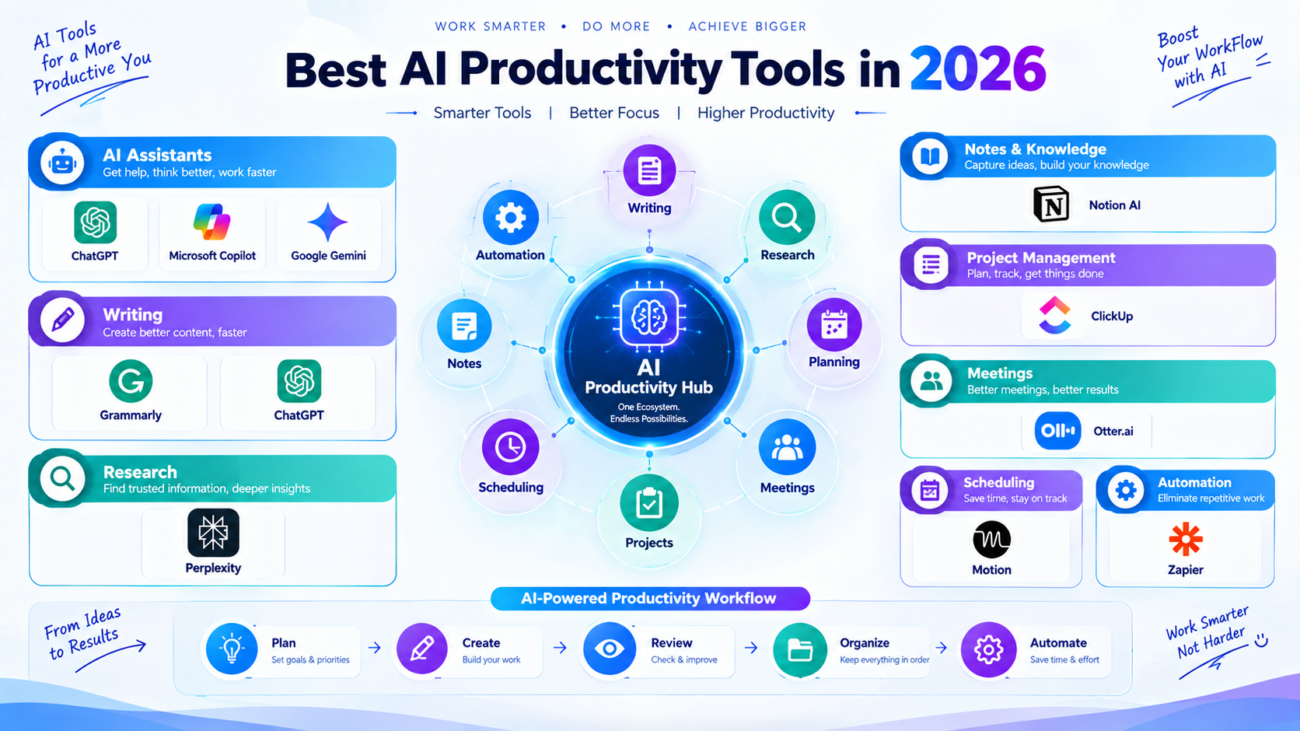
Create a Simple AI Productivity Workflow
A simple workflow can often be more effective than a complicated collection of AI applications.
For example:
Plan → Create → Review → Organize → Automate
First, use an AI assistant to plan the task.
Next, create the first draft or complete the initial work.
Then review the AI-generated output carefully.
Organize the final information inside your preferred workspace.
Finally, automate repetitive steps where appropriate.
This keeps AI involved without allowing the technology to control the entire workflow.
Common Mistakes to Avoid
AI productivity tools can be extremely useful, but there are some common mistakes to avoid.
Using Too Many Tools
Installing ten different AI applications does not automatically make you more productive. Start with a small number of tools that solve real problems.
Trusting AI Without Checking
AI can make mistakes or provide incomplete information. Important information should always be reviewed.
Automating Everything
Not every task should be automated. Some activities require human judgment, creativity, communication, or careful decision-making.
Ignoring Privacy
Before uploading confidential documents or business information, understand how the tool handles your data and what permissions it requires.
Focusing Only on Features
A tool with hundreds of features is not necessarily useful for your workflow. Choose software based on the specific problems you want to solve.
Final Thoughts
AI productivity tools are becoming an important part of modern work in 2026. From writing and research to meetings, scheduling, project management, and automation, AI can reduce repetitive work and help people organize their time more effectively.
Tools such as ChatGPT, Microsoft Copilot, Google Gemini, Notion AI, ClickUp, Grammarly, Perplexity, Otter.ai, Zapier, and Motion can support different parts of a productivity workflow.
The most important thing is not to use every AI tool available. Instead, identify where you lose the most time and choose a tool that addresses that specific problem.
Start with one useful tool, build a simple workflow, review AI-generated work carefully, and expand your system only when it provides a clear benefit.
Used thoughtfully, AI can become a practical productivity assistant that helps you spend less time on repetitive work and more time on meaningful tasks.
