


Running a small business often means doing many different jobs at the same time. A business owner may need to manage customers, create marketing content, respond to emails, organize projects, handle administrative work, and monitor business performance.
Artificial intelligence is changing the way small businesses handle these tasks. Modern AI tools can help with writing, research, marketing, customer communication, design, project management, data analysis, and automation.
In 2026, small businesses have access to a growing number of AI-powered tools. These tools can help business owners save time, improve productivity, and create more efficient workflows.
However, choosing the right tools can be difficult because there are so many options available. The best approach is to identify your business needs first and then choose AI tools that solve specific problems.
In this guide, we will look at some of the best AI tools for small businesses in 2026 and explain how they can be useful.
Why Small Businesses Are Using AI
Large companies often have separate teams for marketing, customer service, sales, design, research, and administration. Small businesses usually have fewer employees, so one person may handle several responsibilities.
AI can help reduce some of this workload.
For example, a business owner can use AI to create a first draft of an email instead of writing everything from scratch. A marketing team can use AI to brainstorm campaign ideas, while a design platform can help create social media graphics.
Automation tools can also connect different applications and reduce repetitive tasks.
The purpose of using AI is not necessarily to replace people. Instead, businesses can use AI to handle repetitive work while employees focus on creativity, strategy, customer relationships, and important decisions.
1. ChatGPT
ChatGPT is one of the most flexible AI tools for small businesses.
It can help with writing, brainstorming, research, planning, customer communication, content creation, and many everyday business tasks.
A small business owner can use ChatGPT to create blog ideas, draft emails, develop product descriptions, prepare social media posts, or organize a marketing plan.
For example, if you run an online store, you can provide basic product information and ask AI to create several possible product descriptions. You can then edit the content to match your brand voice.
ChatGPT can help with:
- Email drafts
- Blog ideas
- Social media content
- Product descriptions
- Marketing ideas
- Business plans
- Customer response drafts
- Meeting preparation
- Research
- Brainstorming
The final content should always be reviewed before it is published or sent to customers.
2. Microsoft Copilot
Microsoft Copilot can be useful for businesses that already rely on Microsoft’s productivity software.
Depending on the available plan and features, AI assistance can support workflows involving applications such as Word, Excel, and PowerPoint.
For example, a business owner can use AI assistance to help draft a business document, summarize information, analyze data, or prepare a presentation.
This can be particularly useful for businesses that spend a significant amount of time working with documents and spreadsheets.
Instead of moving information between multiple tools, employees can receive AI assistance within familiar work environments.
3. Google Gemini
Google Gemini is another AI assistant that can support small business workflows.
It can help with brainstorming, writing, summarization, research, and other productivity tasks.
Businesses that already use Google’s ecosystem may find it useful for workflows involving documents and other Google services, depending on the available features and plan.
For example, a business owner could use Gemini to generate marketing ideas, summarize notes, create an outline, or explore questions related to a business project.
AI-generated information should still be checked carefully, especially when it involves important business decisions or factual claims.
4. Canva
Visual content is essential for modern businesses.
Small businesses need graphics for social media, websites, advertisements, presentations, promotional materials, and product marketing.
Canva provides design tools along with AI-powered features that can help businesses create visual content more efficiently.
You do not necessarily need advanced graphic design skills to create useful marketing materials.
Canva can be used for:
- Social media posts
- Advertisements
- Presentations
- Flyers
- Posters
- Business graphics
- Marketing materials
- Product visuals
AI-assisted design features can help speed up the creative process, while templates can provide a useful starting point.
5. Grammarly
Professional communication is important for small businesses.
Emails, proposals, website pages, reports, social media posts, and marketing messages all need to be clear and easy to understand.
Grammarly can help improve grammar, spelling, clarity, readability, and tone.
A business owner can use it to review an important customer email before sending it. Marketing teams can also use writing assistance when preparing website copy or promotional content.
This can be particularly useful for small businesses that do not have a dedicated editor.
6. Notion AI
Organization can become challenging as a small business grows.
Notion can help businesses organize notes, projects, documents, ideas, and internal information. Its AI features can assist with summarization, writing, brainstorming, and information organization.
A small business could create a central workspace for:
- Project information
- Meeting notes
- Business procedures
- Content ideas
- Marketing plans
- Product information
- Team documentation
- Task lists
Keeping important information organized can make collaboration easier and reduce time spent searching for documents.
7. ClickUp
ClickUp is a project management platform that includes AI-powered features.
Small businesses can use project management software to organize tasks, deadlines, projects, and team responsibilities.
AI features can assist with writing, summaries, task-related information, and workflow organization, depending on the available plan.
For example, a business launching a new product could create separate tasks for research, product development, marketing, design, testing, and launch.
This makes it easier for team members to understand what needs to be done and when.
8. Perplexity
Research is another area where AI can help small businesses.
Perplexity can help users explore topics and find information through an AI-powered research experience.
A business owner may use it to investigate an industry, explore customer questions, research a topic for a blog article, or identify areas that require additional research.
However, AI research tools should be treated as research assistants rather than unquestionable sources.
Important statistics, business information, regulations, and other critical facts should be verified using reliable original sources.
9. Zapier
Automation can save small businesses a significant amount of repetitive work.
Zapier allows businesses to connect different applications and create automated workflows.
For example, a business could create an automated workflow where a new form submission triggers an action in another application.
Automation can be useful for:
- Lead management
- Notifications
- Email workflows
- Customer information
- Data transfer
- Task creation
- Marketing processes
- Administrative tasks
AI-powered automation can make it easier to build and manage certain workflows using natural-language instructions and intelligent actions.
The result can be fewer repetitive manual steps.
10. HubSpot
Customer relationships are extremely important for small businesses.
HubSpot provides tools for customer relationship management, marketing, sales, and customer service. AI features are available across parts of its platform, depending on the product and plan.
A CRM can help businesses organize customer information, leads, sales activities, and conversations.
AI assistance can support tasks such as content creation, summarization, customer communication, and other workflows.
This can become increasingly useful as a small business gains more customers and needs a structured way to manage relationships.
11. QuickBooks
Financial management is a critical part of running a small business.
QuickBooks provides accounting and financial management software with automation and AI-related features, depending on the product and plan.
Businesses can use accounting software to organize transactions, invoices, expenses, and other financial information.
Automation can reduce some manual administrative work, but business owners should still carefully review financial records.
For important accounting, tax, or financial decisions, professional advice may be appropriate.
12. Otter.ai
Meetings and customer conversations can contain valuable information.
Otter.ai can help create transcripts from spoken conversations and make it easier to review discussions later.
Small businesses can use transcription tools for:
- Team meetings
- Client calls
- Interviews
- Research conversations
- Planning sessions
- Business discussions
Instead of relying entirely on handwritten notes, employees can review a transcript and identify important points afterward.
Businesses should make sure that recording and transcription follow applicable laws, company policies, and appropriate consent requirements.
AI Tools for Small Business Marketing
Marketing is one of the areas where AI can provide significant assistance.
Small businesses can use AI to brainstorm campaign ideas, create content outlines, draft social media captions, generate visual concepts, and organize content calendars.
For example, a local business could ask an AI assistant to generate content ideas around common customer questions.
The business owner can then add real customer experiences, local information, promotions, and brand-specific details.
This creates content that combines AI assistance with authentic business knowledge.
AI for Customer Service
Customer service can require a significant amount of time.
Many businesses receive the same questions repeatedly about products, pricing, delivery, opening hours, returns, or services.
AI can help employees create responses to common questions or find relevant information faster.
However, businesses should maintain human oversight for complex customer problems.
Customers should have a clear path to human assistance when an issue involves complaints, refunds, unusual circumstances, or sensitive information.
AI for Content Creation
Content marketing can be difficult for a small business with limited resources.
AI tools can help generate ideas and first drafts for:
- Blog posts
- Social media posts
- Newsletters
- Product descriptions
- Video scripts
- Advertisements
- Educational content
However, businesses should not simply publish unedited AI-generated content.
Adding original experiences, useful examples, expert knowledge, and brand personality can make the final content more valuable.
AI for Business Automation
Automation is one of the biggest advantages of AI technology.
Small businesses often perform repetitive tasks every day. These might include moving information between applications, sending notifications, creating tasks, updating records, or organizing customer information.
Automation tools can connect different applications and reduce manual steps.
For example:
Customer Form → CRM → Team Notification → Task Creation → Follow-Up
Instead of employees manually completing every step, an automated workflow can handle appropriate parts of the process.
This can save time and reduce the chance of simple administrative mistakes.
How to Choose the Right AI Tools
There is no single AI tool that is perfect for every small business.
Start by identifying your biggest challenge.
>If writing takes too much time, consider an AI writing assistant.
>If your business struggles with organization, consider a project management or knowledge-management platform.
>If repetitive tasks consume employee time, consider automation software.
>If creating marketing graphics is difficult, consider an AI-powered design platform.
Before choosing a tool, consider:
- Price
- Ease of use
- Business integrations
- Privacy
- Security
- Available features
- Scalability
- Team requirements
A small number of well-chosen tools can be more useful than subscribing to many platforms that your team rarely uses.
Benefits of AI for Small Businesses
Saves Time
AI can speed up repetitive tasks such as drafting, summarizing, organizing, and researching.
Reduces Repetitive Work
Automation can reduce manual steps in everyday workflows.
Supports Marketing
AI can help generate content ideas, drafts, and visual concepts.
Improves Organization
AI-powered productivity platforms can help teams manage information and projects.
Supports Small Teams
A small team can use AI assistance to handle certain tasks that might otherwise require additional time or resources.
Important Things to Consider
AI can provide useful assistance, but businesses should use it responsibly.
Protect Sensitive Information
Avoid entering confidential customer information, passwords, financial details, or sensitive company data into AI tools unless the service and your organization’s policies allow it.
Review AI Output
AI can make mistakes. Always review important business content before using it.
Check AI Tool Policies
Understand how a service handles data, privacy, commercial use, and other important terms.
Train Your Team
If employees use AI, create simple guidelines explaining acceptable use and information that should not be shared with AI systems.
Simple AI Workflow for Small Businesses
A simple AI-supported business workflow could look like this:
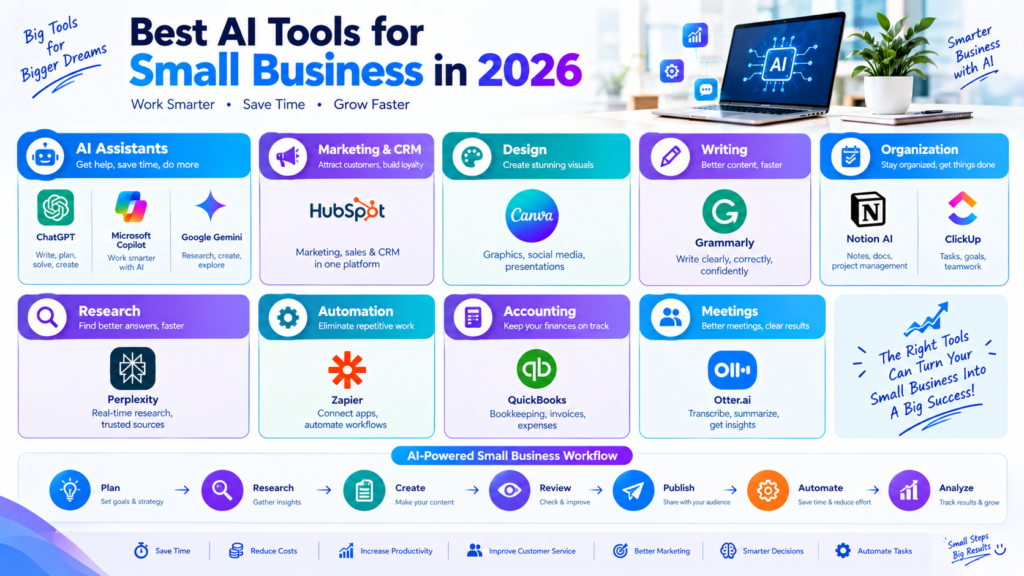
Plan → Research → Create → Review → Publish → Automate → Analyze
First, define the business objective.
Next, use AI to support research and brainstorming.
Create the content or complete the task.
Review the AI-assisted result.
Publish or deliver the final work.
Automate repetitive steps where appropriate.
Finally, analyze the results and improve the workflow.
This approach keeps AI focused on practical business goals.
Final Thoughts
AI tools are becoming an important part of small business technology in 2026. They can help with writing, marketing, research, customer service, design, project management, meetings, accounting workflows, and automation.
Tools such as ChatGPT, Microsoft Copilot, Google Gemini, Canva, Grammarly, Notion AI, ClickUp, Perplexity, Zapier, HubSpot, QuickBooks, and Otter.ai can support different areas of a small business.
The key is to choose tools based on your actual business needs.
AI should not be used simply because it is popular. Instead, identify repetitive or time-consuming tasks and determine where AI can provide practical value.
>When combined with human judgment, careful review, good security practices, and clear business goals, AI can help small businesses build more efficient and productive workflows in 2026.
