
Writing is an important part of modern digital work. Whether you are a blogger, freelancer, student, marketer, business owner, or professional, you may spend hours every week writing emails, articles, social media posts, reports, proposals, and other documents.
AI writing tools can make many of these tasks faster and easier.
In 2026, AI writing software can help users brainstorm ideas, create outlines, improve sentences, summarize information, check grammar, rewrite content, and adapt writing for different audiences. Some tools are designed for general writing, while others focus on editing, marketing, research, or long-form content.
However, AI should not completely replace the writer. Good writing still requires human creativity, fact-checking, experience, and judgment.
In this guide, we will explore some of the best AI writing tools in 2026 and explain what each one can be used for.
What Are AI Writing Tools?
AI writing tools are software applications that use artificial intelligence to assist with written content.
Depending on the platform, they can help with:
- Blog posts
- Articles
- Emails
- Social media posts
- Product descriptions
- Marketing copy
- Reports
- Proposals
- Grammar and spelling
- Rewriting
- Summarization
- Brainstorming
- Content outlines
Some tools are general-purpose AI assistants, while others are specifically designed for professional writing and editing.
The right choice depends on what you write and how much control you want over the final content.
1. ChatGPT – Versatile AI Writing Assistant
ChatGPT is one of the most flexible AI tools for writing.
It can help users brainstorm topics, create outlines, rewrite paragraphs, simplify complicated explanations, draft emails, generate ideas, and improve existing content.
For bloggers, ChatGPT can help turn a topic into a structured article outline. Freelancers can use it to prepare proposals or client messages. Business owners can use it to draft emails and marketing ideas.
One of its biggest advantages is flexibility. You can provide detailed instructions about your desired tone, audience, format, and purpose.
For example, instead of simply asking for an article, you can explain the target audience, desired structure, keywords, and tone.
The writer should still review the result and add original expertise.
Best for: General writing, brainstorming, outlines, emails, articles, and content ideas.
2. Claude – Long-Form Writing and Editing
Claude is another AI assistant that can be useful for writers working with longer documents.
It can help with drafting, rewriting, summarizing, analyzing, and organizing large amounts of text.
This makes it useful for writers who regularly work with reports, documentation, articles, proposals, and other long-form material.
A writer can provide background information and ask the AI to organize ideas into a logical structure.
It can also help identify repetitive sections or improve the flow of a draft.
As with any AI writing tool, the final text should be reviewed for accuracy, originality, tone, and relevance.
Best for: Long-form writing, document analysis, rewriting, and editing.
3. Grammarly – AI Writing and Editing
Grammarly focuses heavily on writing improvement and editing.
It can help users identify grammar, spelling, punctuation, clarity, and style problems.
For professionals, this can be especially useful when writing emails, reports, proposals, or other important communications.
Bloggers and content writers can also use it as a final editing step before publishing.
Instead of replacing the writing process, Grammarly can work as a second layer of review.
For example, you can write your article normally and then use an editing tool to identify sentences that are unclear or unnecessarily complicated.
Best for: Grammar, proofreading, editing, clarity, and professional communication.
4. QuillBot – Paraphrasing and Rewriting
QuillBot is well known for paraphrasing and rewriting text.
It can be useful when you want to express an idea differently, simplify a sentence, or improve the flow of existing content.
Students, writers, marketers, and professionals can use it for rewriting tasks.
For example, if a sentence sounds too complicated, a paraphrasing tool can provide an alternative version that may be easier to understand.
However, paraphrasing does not automatically make information original or factually correct. Users should understand the source material and review the rewritten text carefully.
Best for: Paraphrasing, rewriting, summarizing, and improving sentence structure.
5. Jasper – Marketing Content
Jasper is designed with marketing and business content in mind.
Marketing teams and businesses often need to produce different types of content, including advertisements, landing pages, email campaigns, social media content, and product messaging.
AI can help generate initial ideas and drafts for these tasks.
A marketing professional can provide information about a product, target audience, campaign objective, and brand voice before creating a draft.
The resulting content can then be edited to match the company’s strategy and messaging.
Jasper is particularly relevant to users who need AI assistance for marketing-focused writing rather than general everyday writing.
Best for: Marketing copy, advertising content, campaigns, and business writing.
6. Copy.ai – Sales and Marketing Writing
Copy.ai is another AI platform focused on business and marketing workflows.
It can help with content creation, sales messaging, marketing copy, and related business tasks.
Sales teams can use AI to create initial versions of outreach messages. Marketing teams can brainstorm campaign ideas or create variations of promotional content.
The major benefit of AI in this area is the ability to generate multiple ideas quickly.
However, effective marketing still requires understanding the customer. AI-generated copy should be adjusted to reflect the brand’s actual value proposition and audience.
Best for: Marketing copy, sales content, outreach, and business messaging.
7. Writesonic – Blog and Marketing Content
Writesonic provides AI-powered tools designed for content creation and marketing.
It can help users generate ideas, create drafts, improve existing text, and develop different types of digital content.
Bloggers can use AI to create an initial structure for an article and then add their own research, examples, experience, and insights.
The tool can also be useful for marketing teams that need variations of content for different channels.
AI-generated content should always be reviewed before publication, particularly when accuracy and brand reputation are important.
Best for: Blog content, marketing copy, articles, and digital content.
8. Wordtune – Rewriting and Sentence Improvement
Wordtune focuses on helping users improve and rewrite existing text.
It can be useful when you know what you want to say but are not satisfied with how a sentence sounds.
For example, you can rewrite a sentence to make it clearer, shorter, more professional, or more conversational.
This can be helpful for emails, reports, articles, and professional communication.
Instead of generating an entire document from scratch, writers can use this type of tool to refine their own writing.
Best for: Rewriting, sentence improvement, clarity, and professional writing.
9. DeepL Write – Writing Improvement
DeepL is widely known for translation, but DeepL Write also provides AI-assisted writing improvement.
It can help users refine wording, grammar, and style.
This can be especially useful for people who write in English as a second language or communicate with international clients.
A writer can create an initial draft and then use an AI writing assistant to improve phrasing and readability.
The goal should be to make communication clearer while preserving the writer’s intended meaning.
Best for: English writing improvement, editing, international communication, and style refinement.
10. Microsoft Copilot – AI for Everyday Writing
Microsoft Copilot can assist with various writing and productivity tasks.
For professionals already using Microsoft’s ecosystem, AI assistance can be useful for drafting, summarizing, brainstorming, and organizing information.
For example, a professional may use AI to create an initial email draft or summarize a lengthy document before reviewing it.
This can reduce the time spent on routine writing tasks.
The final version should always be reviewed because context, tone, and accuracy matter in professional communication.
Best for: Emails, workplace writing, summaries, documents, and productivity.
How AI Writing Tools Help Writers

AI writing tools can support writers at different stages of the writing process.
1. Brainstorming
Sometimes the hardest part of writing is deciding what to write.
AI can generate possible topics, angles, questions, and content ideas.
2. Creating Outlines
An AI assistant can turn a broad topic into an organized outline.
This gives the writer a structure before drafting begins.
3. Writing First Drafts
AI can produce an initial draft based on instructions.
The writer can then edit the draft and add original information.
4. Editing
AI tools can identify grammar issues, awkward wording, repetition, and unclear sentences.
5. Repurposing Content
A long article can be transformed into social media ideas, email content, summaries, or short posts.
6. Improving Productivity
When routine writing tasks take less time, writers can focus more on research, creativity, and strategy.
Best AI Writing Tools for Different Users
Not every writer needs the same tool.
Bloggers
Bloggers may benefit from general AI assistants, research tools, and editing software.
A useful workflow can be:
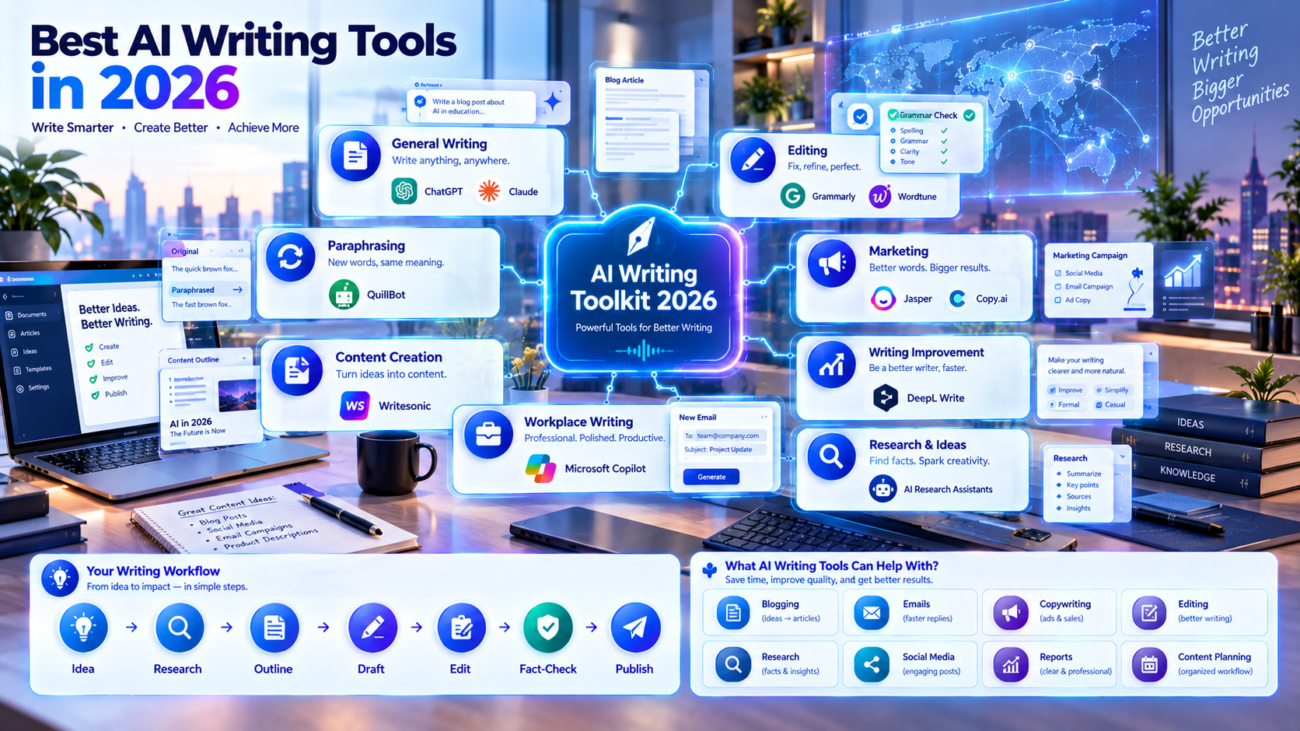
Research → Outline → Draft → Edit → Fact-Check → Publish
Freelancers
Freelancers often need to write proposals, client emails, articles, social media content, and reports.
A general AI assistant combined with a writing editor can cover many of these needs.
Students
Students can use AI writing tools for brainstorming, understanding concepts, improving grammar, and organizing ideas.
AI should support learning rather than simply generate assignments for submission.
Marketers
Marketing professionals can benefit from tools designed for copywriting, campaigns, product descriptions, email marketing, and social media content.
Business Owners
Business owners can use AI writing tools to draft emails, website copy, announcements, product descriptions, and internal documents.
How to Choose the Right AI Writing Tool
Choosing an AI writing tool becomes easier when you start with your specific problem.
Ask yourself:
- What type of content do I write?
- Do I need full content generation or editing?
- Do I work with long documents?
- Do I need marketing-specific features?
- Do I need grammar and proofreading?
- Do I write in multiple languages?
- Do I need integrations with other software?
- How much content do I create every month?
For example, someone who mainly writes emails may not need a specialized long-form content platform.
A blogger may need stronger outlining and research support.
A marketing team may need tools specifically designed for campaigns and brand messaging.
AI Writing Workflow for Better Results
Using AI effectively is more important than simply using an AI tool.
A practical workflow looks like this:
Step 1: Define the Goal
Decide exactly what you want to create.
Step 2: Provide Context
Give the AI relevant information about the audience, topic, tone, and purpose.
Step 3: Generate an Outline
Create a structure before producing the full draft.
Step 4: Create the Draft
Use AI to assist with the first version.
Step 5: Add Human Expertise
Add your own experience, examples, opinions where appropriate, data, and insights.
Step 6: Edit
Improve grammar, clarity, structure, and tone.
Step 7: Fact-Check
Verify important claims using reliable sources.
Step 8: Final Review
Make sure the content accurately represents your intended message before publishing or sending it.
This workflow gives you the speed of AI while keeping human control over the final result.
Common Mistakes When Using AI Writing Tools
Publishing AI Content Without Reviewing It
AI-generated text can contain incorrect information or repetitive language.
Always review the content.
Using Generic Prompts
The quality of AI output often improves when you provide useful context.
Instead of saying “write an article,” explain the topic, audience, tone, structure, and objective.
Losing Your Own Writing Style
If every article is generated in exactly the same way, your content may lose its unique voice.
Use AI as an assistant while maintaining your personal style.
Ignoring Fact-Checking
AI can make confident statements that are not accurate.
Important statistics, dates, names, research findings, and technical claims should be verified.
Focusing Only on Speed
Fast writing is not necessarily good writing.
The goal should be useful, accurate, clear, and original content.
Are AI Writing Tools Replacing Writers?
AI is changing how writing is produced, but writing still requires human judgment.
A writer provides context, creativity, expertise, personal experience, strategic thinking, and editorial decisions.
AI can help generate or improve text, but the final quality depends heavily on how the writer uses the tool.
The most useful approach is to treat AI as a writing assistant rather than an automatic replacement for human creativity.
Final Thoughts
The best AI writing tools in 2026 offer different benefits.
ChatGPT and Claude can assist with general and long-form writing. Grammarly and Wordtune can help improve existing text. QuillBot focuses on paraphrasing and rewriting. Jasper and Copy.ai are useful for marketing-focused content. Writesonic supports digital content creation, while DeepL Write can help improve writing and communication.
You do not need to use every tool.
Start with one tool that matches your biggest writing problem. Learn how to give it useful instructions, review the results carefully, and combine AI assistance with your own knowledge and creativity.
The strongest AI-assisted writing workflow is not simply AI generates → Publish.
A better approach is:
Idea → Research → AI Assistance → Human Editing → Fact-Check → Final Content
When used this way, AI writing tools can save time while helping writers produce clearer and more useful content.
